
Changes Are Coming To ParentSquare Text Alerts
Blue Devil Families,
We wanted to reach out to you to inform you of an upcoming change to text message notifications from ParentSquare.
Soon, many of the text messages you get through ParentSquare will come from regular 10-digit phone numbers. This will make it easier to see who is messaging you. For example, a message from your child’s teacher will come from a different phone number than a message from the school office.
What’s changing?
Right now, most texts come from a 5-digit number. Soon, you’ll start getting texts from different regular 10-digit phone numbers for:
Direct messages
Classroom and group posts
School posts
Messages from the district, digests and alerts will still come from the 5-digit number as in the past.
Note: each district has 15 unique numbers available for notifications as assigned by ParentSquare. If you have more than 15 unique threads, one of the numbers will be re-used. If the number is re-used, a text will be sent by the system to explain the transition.
Why is this happening?
Per ParentSquare, there are two key reasons behind this update:
A better experience for families: You’ll be able to see who a message is from and keep texts organized by person or school. For example, messages from your child’s teacher will come from a different number than messages from the school office—so it’s easier to stay on top of conversations and know exactly who’s contacting you.
Industry-wide updates from phone carriers: Phone providers like Verizon, AT&T, and T-Mobile now require messages like these to come from 10-digit phone numbers instead of short codes. This change helps providers reliably deliver messages and avoids providers mistakenly flagging them as spam.
Will this affect the app or email?
No. Emails and app messages will stay exactly the same. This change only affects text messages (SMS).
What should you do?
If you receive text alerts from ParentSquare, be on the lookout for a message from any of the new ten digit numbers. When you receive a text message from one of these new 10-digit numbers, save it to your contacts for the year in a way you can easily recognize. Here are some suggestions:
Save the teacher’s assigned number as: (Teacher’s Name) - 4th Grade
Save classroom/group posts as: “CMS 8th Grade”, or “Boys’ Modified Basketball”, etc.
Save school posts number as: “(School Name) Updates”
What it looks like: Before and After
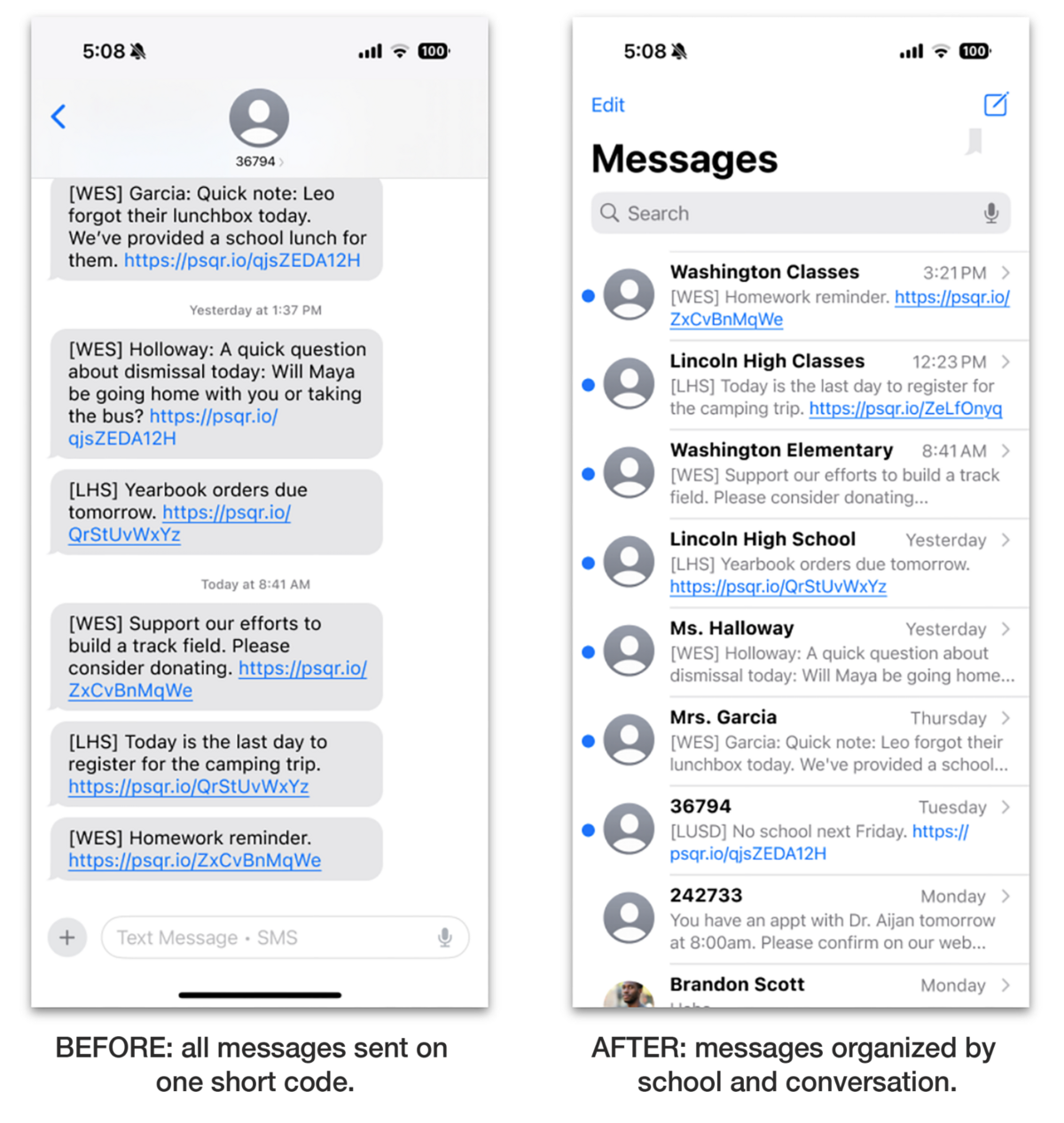
Read more about this change and some helpful tips: Changes to ParentSquare Text Messages.